Requests open · Scope and availability confirmed before payment

Demonstration report / November 5, 2026

Morrowcove sample report

This fictional website has four deliberately added issues. The short summaries show what a visitor would notice; open each detail for the recorded checks and evidence. No fixes have been made.

Request a website check

The $89 USD pilot covers up to five public pages and one thing visitors should be able to do. We confirm scope, availability, total price and dates before payment.

See a before-and-after quote button retest Try a website that forgets your service choice See why a booking can show the wrong day Read the four sample findings Download the findings CSV

What this sample is

This is a fictional practice site with four issues added on purpose. We checked those issues and recorded what happened. It is not a customer review and does not show sales, customer results, or how often issues would be found on other sites.

The report records what worked, too.

These examples come from the same fictional review. A real report reflects only the checks performed on your agreed pages.

Worked in this check
The Contact link opened the Contact page.
Needs attention
The quote button led to a missing page.
Not tested
Real form delivery, payments and physical phones.

If no issues are found, the report still lists what was checked and what remains untested. It does not certify the whole website.

01 — At a glance

Four issues in the fictional example.

The labels describe the effect seen in this fictional example. No financial impact was measured.

02 — Findings & evidence

Details for someone making the change.

The short explanation comes first. Open “Technical check details” for the page path, steps, measurements, and suggested change. All four sample issues remain in the fictional site.

01 Quote link
High

The quote button opens an error page.

Point the quote button to a working quote page.

Technical check details

Recorded path: /demo/ → /demo/request-quote.html. Open live demo home.

Reproduce

  1. Open the demo homepage in the tested desktop viewport.
  2. Select the “Request a quote” button.
  3. Observe the destination page.

Expected

The primary button opens a usable quote-request destination.

Observed

The destination /demo/request-quote.html displays a 404 error.

Why it matters

The advertised quote-request path ends at an error. This establishes a blocked action, not lost revenue or a measured conversion effect.

Suggested action

Create the intended destination or update the button to a working, appropriate page.

Retest after a fix

Click the button again from the homepage and verify that the intended page loads. Check any downstream action only under a separately agreed scope.

View captured evidence 404 destination

Captured browser view of the quote-request destination displaying a 404 error
Observed after following the homepage quote button in the local demonstration. Screenshot: quote-404.jpg. Open full-size quote error screenshot

Status: observed in the seeded sample. Suggested repair has not been applied or retested.
02 Page link
Medium

The Services link does not reach the information.

Correct the Services link so it takes visitors to the right information.

Technical check details

Recorded path: /demo/ → /demo/#services. Open live demo home.

Reproduce

  1. Open the homepage at the top of the page.
  2. Select “Services” in the navigation.
  3. Observe the fragment, scroll position and matching target count.

Expected

The navigation link moves the visitor to the intended services content.

Observed

The URL changes to /demo/#services. The document contains zero elements matching #services, and the observed scroll position remains scrollY: 0. The relevant content heading uses a different ID.

Why it matters

The section shortcut does not reach its intended destination. Visitors must locate the content themselves.

Suggested action

Give the intended section the ID services, or change the navigation fragment to the correct existing target.

Retest after a fix

From the top of the homepage, follow the Services link and verify that one intended target exists and the correct section is reached at both tested viewport sizes.

View recorded observation Fragment + document target
Link destination
/demo/#services
Elements matching #services
0
Observed scrollY after click
0
Relevant content heading
work-heading

These values were observed during the browser check. This is a written evidence record, not a screenshot or an independently repeated benchmark.

Status: observed in the seeded sample. Suggested repair has not been applied or retested.
03 Small-screen layout
Medium

Part of the homepage is cut off on small screens.

Let the homepage section fit the screen on mobile.

Technical check details

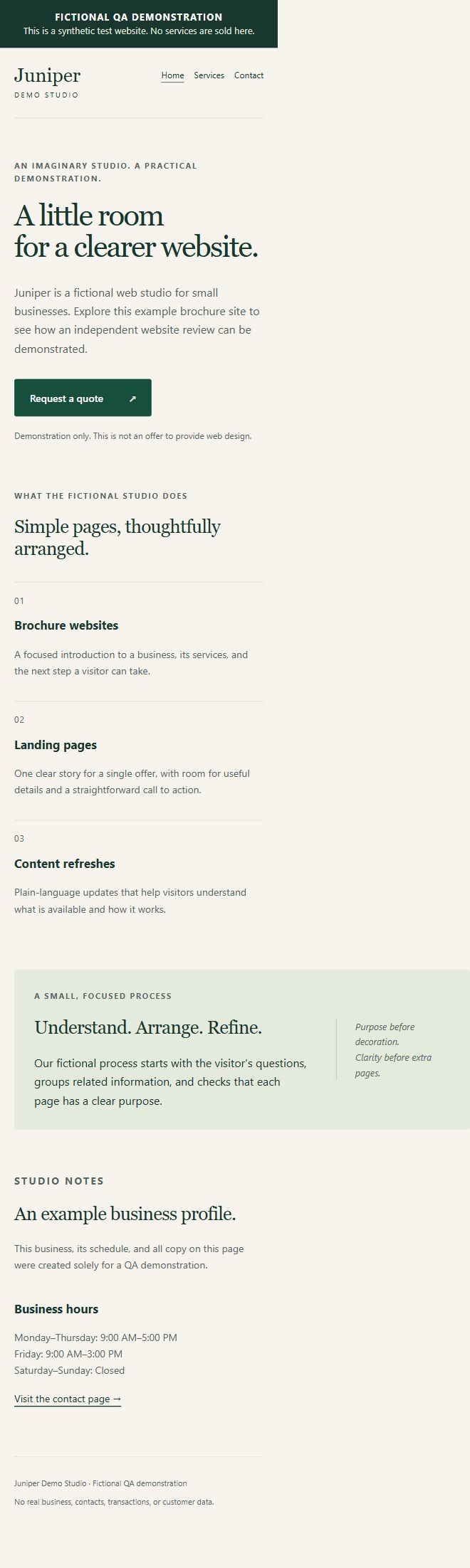
Recorded page: /demo/ · Element: #approach-block. Open live demo home.

Reproduce

  1. Open the homepage with a 390 × 844 emulated mobile viewport.
  2. Inspect the horizontal page extent around the approach section.
  3. Compare document width measurements and the block’s computed minimum width.

Expected

The agreed page content fits within the available layout width without unintended horizontal overflow.

Observed

The document’s client width is 375px and its scroll width is 660px. The approach block has a computed min-width: 640px. The viewport is 390px wide; the scrollbar reduces the measured client width.

Why it matters

Part of the layout extends beyond the visible page width. This can make content harder to read in the tested emulation.

Suggested action

Remove or override the 640px minimum width at narrow viewports and let the approach layout fit its containing block.

Retest after a fix

Recheck at 390 × 844. Confirm that the document scroll width no longer exceeds its client width and that the approach content remains readable. Recheck the desktop layout for regressions.

View captured evidence Mobile emulation + measurements

390 × 844Emulated viewport

375pxDocument client width

660pxDocument scroll width

640pxBlock minimum width

Full-page capture of the fictional demo homepage in mobile emulation, including its overwide approach section
Full-page screenshot, not a cropped device image. Measurements: viewport 390 × 844; document clientWidth 375px; scrollWidth 660px; approach block min-width 640px. Screenshot: demo-mobile.jpg. Open full-size mobile homepage screenshot

Status: observed in emulated mobile coverage. No physical phone or separate mobile browser was tested.

04 Page information
Low

Friday hours differ between Home and Contact.

Confirm the correct Friday hours, then make both pages match.

Technical check details

Recorded pages: /demo/ ↔ /demo/contact.html. Open live demo home or live demo contact.

Reproduce

  1. Read the business-hours section on the homepage.
  2. Open Contact using the navigation.
  3. Compare the stated Friday hours.

Expected

Both pages publish a consistent schedule, or clearly explain any intentional difference.

Observed

The homepage closes Friday at 3:00 PM. The Contact page includes Friday in a 5:00 PM closing schedule.

Why it matters

A visitor receives two different answers about Friday availability. The check establishes inconsistency; it does not establish which schedule is correct.

Suggested action

Confirm the intended schedule with the site owner and update both pages from that single agreed source.

Retest after a fix

Compare the hours on both pages again and confirm that Friday is consistent. Check any other locations where the same schedule appears within the agreed scope.

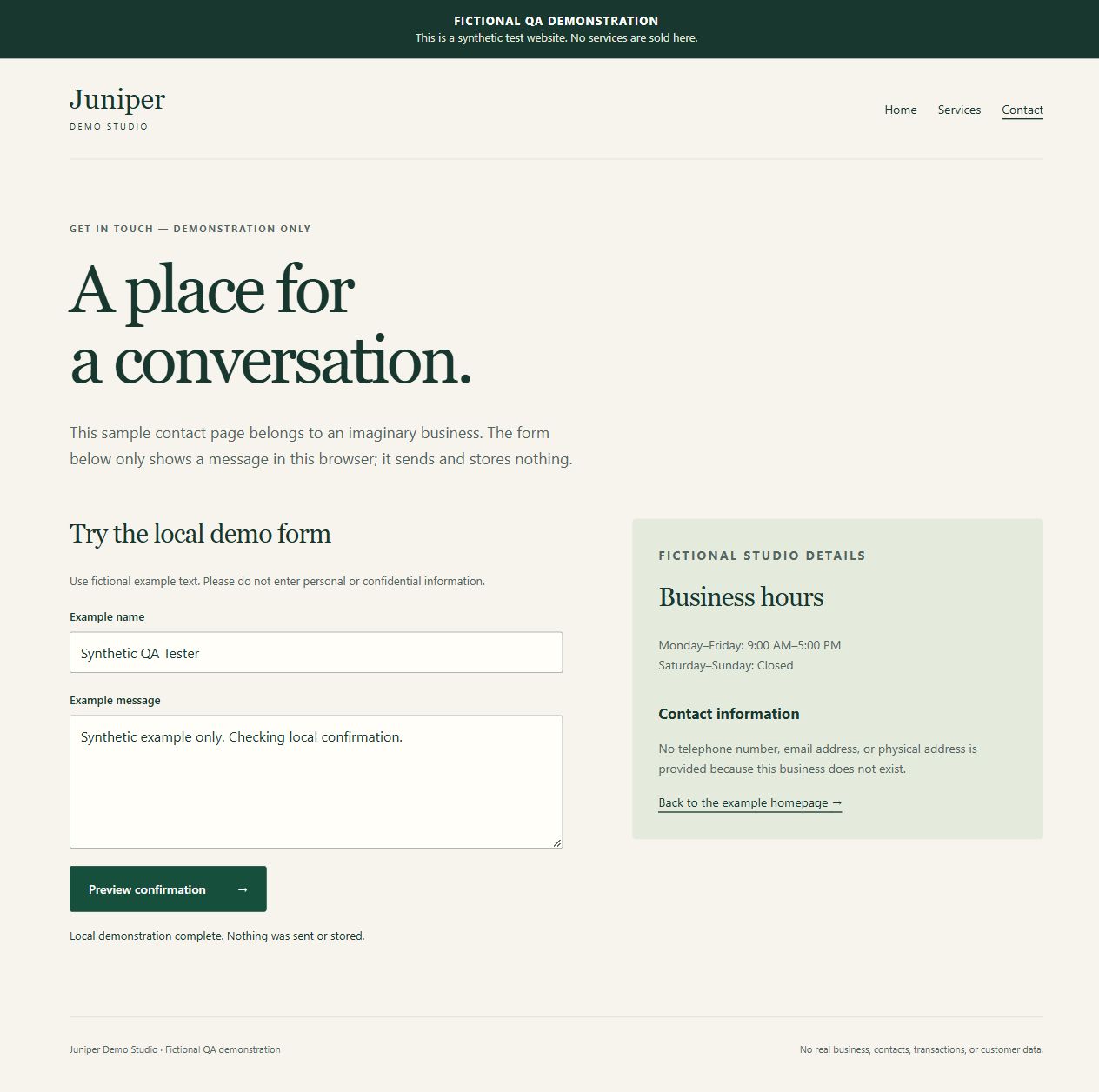
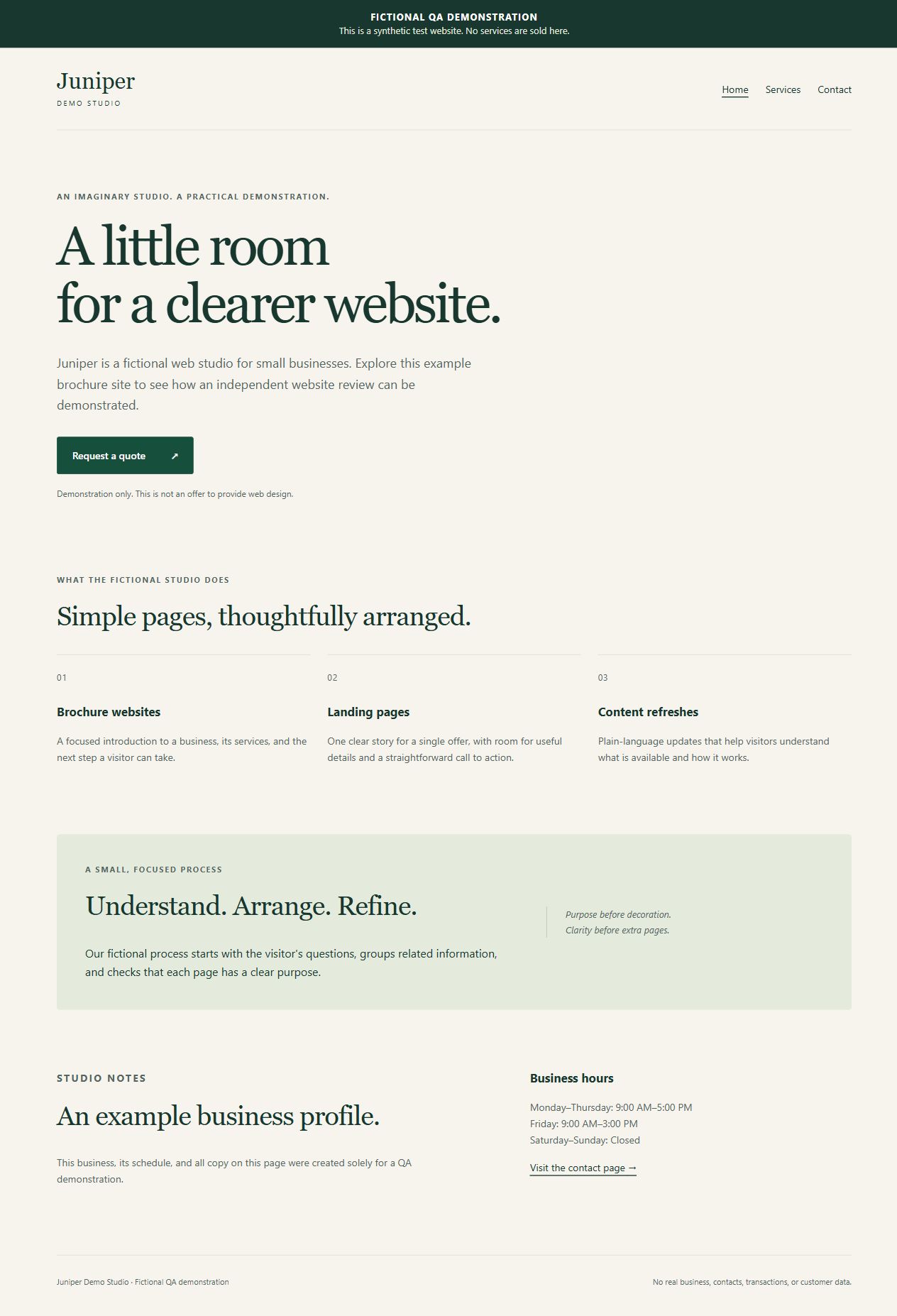
Homepage excerpt
Friday: 9:00 AM–3:00 PM
Contact excerpt
Monday–Friday: 9:00 AM–5:00 PM
View captured evidence Two full-page screenshots
Full-page desktop screenshot of the fictional homepage showing its business-hours section
Homepage full-page capture. Friday ends at 3:00 PM. Screenshot: demo-desktop.jpg. Open full-size desktop homepage screenshot
Full-page desktop screenshot of the fictional contact page showing its business-hours section
Contact full-page capture. Monday–Friday ends at 5:00 PM. Screenshot: contact-desktop.jpg. Open full-size desktop contact page screenshot

Status: observed content mismatch. The intended schedule is not independently established.

03 — Coverage & boundaries

What this sample covers.

We checked two pages, followed links, compared hours, and looked at a simulated small screen. We did not test a live customer site, send a form, or test on a physical phone.

Full list of checks and limits

Observed in this demonstration

  • Home and Contact at the stated desktop and emulated mobile viewports.
  • Homepage quote link, Services fragment and Contact navigation.
  • The Contact link opened the Contact page.
  • Homepage document overflow and the approach block’s computed minimum width.
  • Contact at the mobile viewport measured 375px client width and 375px scroll width.
  • The published business-hours text on both pages.
  • A synthetic name and message in the optional local demo form produced: “Local demonstration complete. Nothing was sent or stored.”

The form’s fields are not required. No required-field validation claim is made.

Outside this review

  • Physical phones, tablets and other browser engines or versions.
  • Production hosting, real business content or real customer journeys.
  • Live form submission, email receipt, storage and delivery.
  • Authentication, payments and purchase flows.
  • Security testing, accessibility certification and search ranking.
  • Performance benchmarks or measured conversion impact.
  • A blind defect-discovery test, all possible defects, or any repaired version.

Passing an individual check does not certify the whole page or website.

04 — Suggested next steps

Fix the issue.
Check it again.

Make the quote button work, link to the Services information, fit the homepage to small screens, and make the Friday hours consistent. Check each change again after it is made. No changes have been made to this sample site.

Download the findings CSV Back to the service overview Explore the fictional demo site

For your own website

Want a second look at your website?

Send us your website and the action a visitor should be able to complete. We’ll confirm whether the check fits. You receive a report with evidence and suggested fixes. Website repairs are not included.

Request a check

No payment or booking commitment when you inquire.

Email Morrowcove directly